Tags: MRP, create, product, invoicing, catalog
Lesson ID-105.1
Updated to:
22/12/2025
Lesson objective
The user needs to be familiar with the product registration process within the system in order to begin creating the product catalog.
To perform this action, you must first log in to the system as instructed in lesson ID-101.1
Create a product
To begin registering products, access the "MRP" (Material Requirements Planning) module.

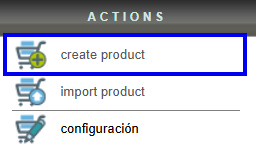
Next, in the "Actions" menu, click on the "Create product" option.
Enter your product information. The fields marked with an asterisk "*": Nombre, Código (alphanumeric), Precio and Unidad are required. Additional information will help you better manage your product, but this data is not mandatory and will not appear on your e-document.
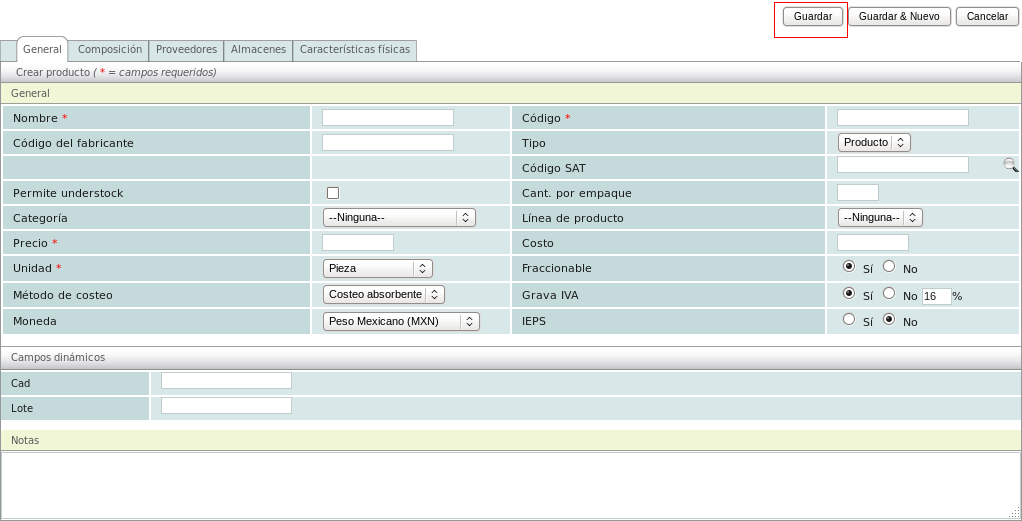
There is an exception for the "Código SAT" and although it's not mandatory to fill it out here, it is necessary to specify it on an invoice, so it's recommended to do so. To learn how to find the relevant code for your product/service, see lesson ID-105.3.
Once you have finished registering the product, click on the "Guardar" button.
Click on lesson ID-105.4 to learn how to select products in a CFDI or a sales order.
Click on lesson ID-103.2 to create an electronic document.
