Tags: configuration, add, unit, product
Lesson ID-105.7
Updated to:
06/01/2026
Lesson objective
The user should know how to add a unit of products or services.
Add unit of products or services
To perform this action, you must first log in to the system as instructed in lesson ID-101.1
Click on the "Settings" button located in the black menu in the upper right corner of the screen.

Click on the "Materiales" section.

The MRP configuration menu will be displayed; click on the "Unidades de productos" button.
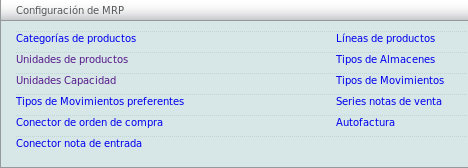
Then go to the menu on the left and click on the "agregar unidad" option.

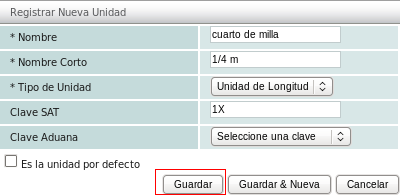
To register the new unit, you must enter at least the "Nombre", "Nombre Corto", and "Tipo de Unidad". Once you have entered this information, click the "Guardar" button to complete the process.