Tags: see, serie, configuration
Lesson ID-106.5.1
Updated to 15/01/2026
Lesson objective
The user should know how to view the series registered in the system.
To perform this action, you must first log in to the system as indicated in lesson ID-101.1View the series of vouchers
The invoice series has a commercial rather than a fiscal purpose; the uniqueness of a CFDI (Digital Tax Receipt) is determined by the "Folio Fiscal" (UUID). However, the invoice series and number facilitate management and quick location within the system.

Since it is commercial in nature, it can have more than one series registered in the system. For example, it can have an invoicing series for its main office and a series for each of its branches, or it can register a series for each of its users, thus quickly identifying who generated each document.
Each series can have a different tax effect. The Solución Factible® invoicing system typically assigns the following default series in the portal "E" for invoices or income e-documents, "NC" for credit notes or expense e-documents, and "PA" for payment complements.
If the client subscribes to the Payroll module, the "RN" series is activated by default for payroll e-documents. If the Carta Porte Complement module is activated, the "T" series is generated, and if the Withholding Tax module is selected "RET" is used. However, you can define the names and effects of each series.
If you have any questions regarding the tax implications, we recommend that you consult lesson ID-103.1.
To perform this action, you must first log in to the system as indicated in lesson ID-101.1
Once inside the system, go to the "Invoicing" module.

Next, click on the "Settings" button located in the "Actions" menu.

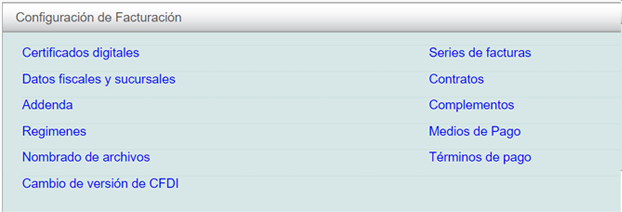
Next, the options available in the configuration panel will be shown. Click on the "Series de facturas" option.
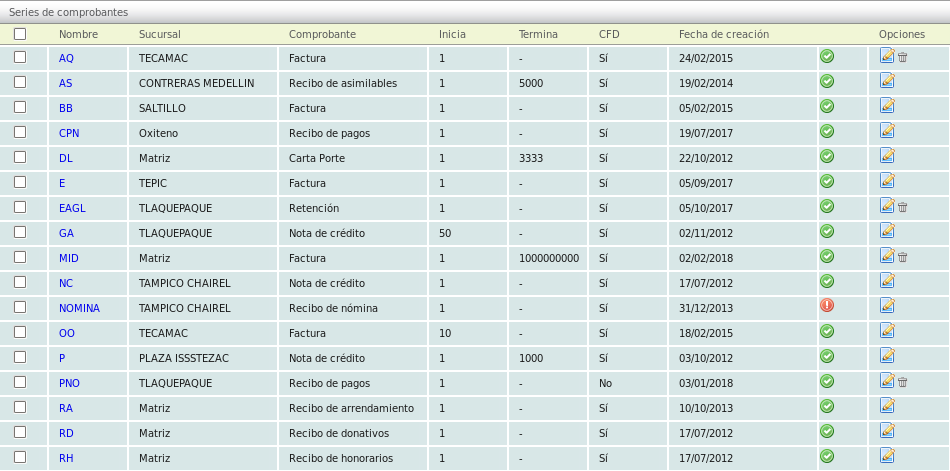
The system will show the list of registered series, indicating the name, the assigned address and the type of e-documents it generates.
If you want to add more series or change the fiscal effect of existing ones, see section ID-106.5.3.
