Tags: payment complement, create, serie
Lesson ID-106.5.2
Updated to:
16/01/2026
Lesson objective
The user should know how to create a series of payment types for a payment complement.
Create a series for payment complement
To perform this action, you must first log in to the system as indicated in lesson ID-101.1
Once inside the portal, access the "Invoicing" module.

Next, click on the "Settings" button located in the "Actions" menu.

The available options in the configuration panel will be displayed shortly. Click on the "Series de facturas" option. 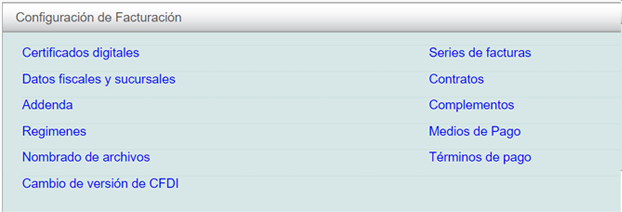
Click on the "crear serie" option located in the "Actions" menu.

In the menu that appears, specify a "Nombre", the "Valor inicial" (usually "1"), ensure the "Comprobante Fiscal Digital" checkbox is selected, and that"Tipo de comprobantes" is specified under "Recibo de pagos".
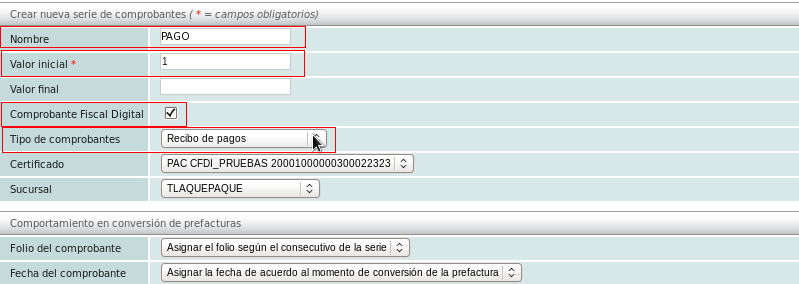
Once finished, click the "Guardar" button.

